


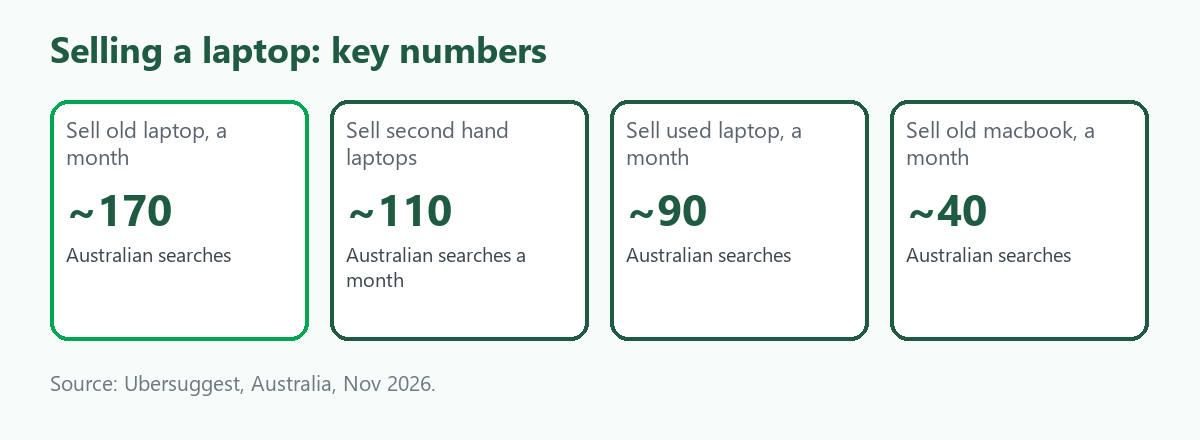
Laptops are the second-biggest group in this category after phones: in Australia, "sell old laptop" is searched about 170 times a month, "sell second hand laptops" about 110, "sell used laptop" and "sell broken laptops" about 90 each and "sell old macbook" about 40, according to Ubersuggest. A laptop holds more personal data than almost anything else you own, so the wipe matters as much as the sale. This guide covers how to wipe Windows laptops and Macs, how to grade one, who buys and how to list a lot. It is part of our guide to selling broken, faulty or old electronics. We give no prices, because we found no reliable source for what laptops sell for, and ScrapTrade has a commercial interest in the scrap trade.
Step 1: Back up and sign out
Copy what you want to keep to another drive or cloud storage, then sign out of your accounts, such as your Microsoft account, Apple Account, browsers, password managers and software licences. Deauthorise any software that limits installations. A reset removes everything from the drive, so back up first.
Step 2: Erase it properly
Windows. Microsoft's reset guide says the Remove everything option reinstalls Windows and removes personal files, apps and settings, and is meant for a PC you are giving away, selling or recycling. Its clean data setting erases the drive as well, which takes longer but makes recovery harder. If the drive is encrypted, you will need your BitLocker recovery key to finish a reset from the recovery environment. Microsoft's cloud rebuild option offers a "remove and sanitize" choice, but Microsoft says sanitising depends on the storage hardware and suggests using the manufacturer's erase tool if you plan to recycle, return or give the PC away. Surface guidance says to choose the full drive clean when selling or recycling.
Mac. Apple says Erase All Content and Settings, in System Settings under General, then Transfer or Reset, works on Apple silicon Macs and Macs with the T2 security chip running macOS Monterey 12 or later. It signs you out of Apple services such as iCloud, turns off Find My and Activation Lock, erases all volumes and user accounts, and leaves the Mac ready for a new owner. If an older Mac cannot use it, Apple's manual route is to sign out of iCloud and iMessage, unpair Bluetooth accessories, erase the disk in macOS Recovery and reinstall macOS. Remove any Boot Camp Windows partition first, because it can block the erase. Apple suggests not completing the setup assistant afterwards, and just shutting the Mac down.
If it will not start. A laptop that does not boot may still hold your data. One older consumer article suggests removing the hard drive before selling or donating. Check cyber.gov.au for current Australian advice. The UK's National Cyber Security Centre notes that a determined expert may recover data after a reset, so data that must never be recoverable needs secure sanitisation or removal of the drive.
Step 3: Grade it
- Working. Boots, charges, screen and keyboard fine. Can be sold whole.
- Repairable. A known fault such as a battery that will not hold charge, a cracked screen or a failing keyboard. A repairer may pay.
- Parts only. Does not boot or has multiple faults. The screen, memory, storage and board may still be used.
- Scrap. Water-damaged, crushed or very old. Recycle it.
Step 4: Choose a route
- Sell whole to a consumer. Best for working laptops, with the most effort. See the best way to sell old electronics online in Australia.
- Trade-in or buy-back. Convenient, with credit based on condition. We could not confirm Australian terms.
- Sell to a repairer, refurbisher or trader. The route for faulty laptops and for lots.
- Recycle free. The National Television and Computer Recycling Scheme accepts laptops, tablets, desktops, monitors, printers and peripherals, free for households and small businesses, according to our search summaries of the department's pages. Charges can apply for larger businesses or at drop-off points outside the scheme. We could not open the government pages, so check what each point accepts.
Why sell laptops on ScrapTrade
The strongest case is bulk. An office refresh, a school's retired fleet or a repair shop's pile of faulty units is awkward to sell to retail buyers one at a time, and a trade marketplace is built for lots. E-waste is one of ScrapTrade's twelve categories, and the buyers include the refurbishers, repairers and recyclers who want this stock. Listing is free with no commission. You post photos and a price, negotiate with buyers directly, and when you accept a bid their 5 percent deposit is held in escrow while the two of you settle collection or shipping. Individuals and businesses can both sell after verification. One recent laptop will often fetch more from a consumer buyer, so weigh that first. The step-by-step is in our pillar guide.
For a lot, list the brands and models, how many boot, the processor, memory and storage where known, battery and screen condition, whether the drives are wiped or removed, and what chargers are included.
What we could not verify
- What laptops sell for, working or broken. We found no reliable source.
- Australian trade-in and buy-back terms.
- The current details of the television and computer recycling scheme.
- ScrapTrade's verification steps. Ask support at cs@scraptrade.com.au.
- How many ScrapTrade buyers want laptops.
Frequently asked questions
How do I wipe a laptop before selling it?
Back up, sign out, then use Remove everything with the clean drive option on Windows, or Erase All Content and Settings on a modern Mac. Remove the drive if the laptop will not start.
Can I sell a broken laptop?
Yes, to a repairer, trader or parts buyer, if you describe the fault and the specification honestly.
Is a used or second-hand laptop worth selling whole?
If it works, usually yes, to a consumer buyer. Faulty or bulk laptops suit a trader.
Can I recycle a laptop for free?
Yes. The national scheme accepts laptops at no charge for households and small businesses.
Sources
- Ubersuggest keyword data for Australia, queried November 2026.
- Microsoft Support, "Reset your PC", cloud rebuild and Surface guidance.
- Apple Support, "What to do before you sell, give away, trade in, or recycle your Mac" and "Erase your Mac and reset it to factory settings".
- Department of Climate Change, Energy, the Environment and Water, National Television and Computer Recycling Scheme pages, as summarised in search results.
- UK National Cyber Security Centre guidance; Christian Science Monitor (2015) on removing drives.
- ScrapTrade website, accessed November 2026.
This is general information, not financial or security advice. ScrapTrade operates a scrap marketplace and has a commercial interest in the scrap trade.