

There is no single word for a device that has stopped being useful. People call it broken, faulty, damaged, dead, not working, old, used, second-hand or just unwanted, and each word points to a different buyer and a different price. A phone with a cracked screen, a laptop that will not charge, a drawer of last year's handsets and a pallet of retired office monitors are all "electronics to sell", but they are four different jobs. This guide is the hub for all of them. It explains what each kind of device is worth and why, who buys it, how to wipe and describe it, what the free recycling schemes cover, and how selling on ScrapTrade works. It is written for households, repairers, offices and small businesses in Australia. We publish no prices, because we found no reliable source for what these devices sell for, and we say where our evidence stops. ScrapTrade operates a scrap marketplace and has a commercial interest in the scrap trade.
What people are searching for
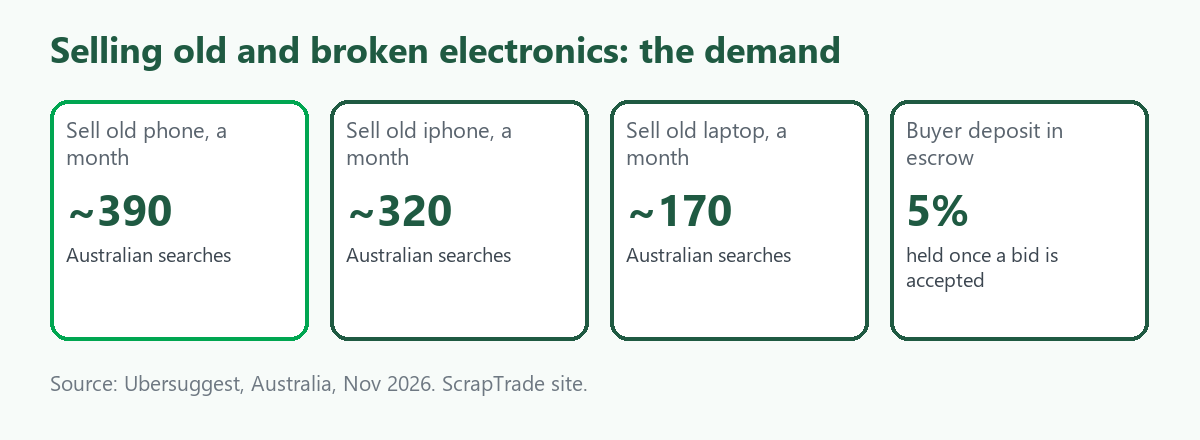
Interest is real but spread thin across many phrasings. Ubersuggest data for Australia, pulled in November 2026, shows the biggest terms are about old and used devices, not broken ones.
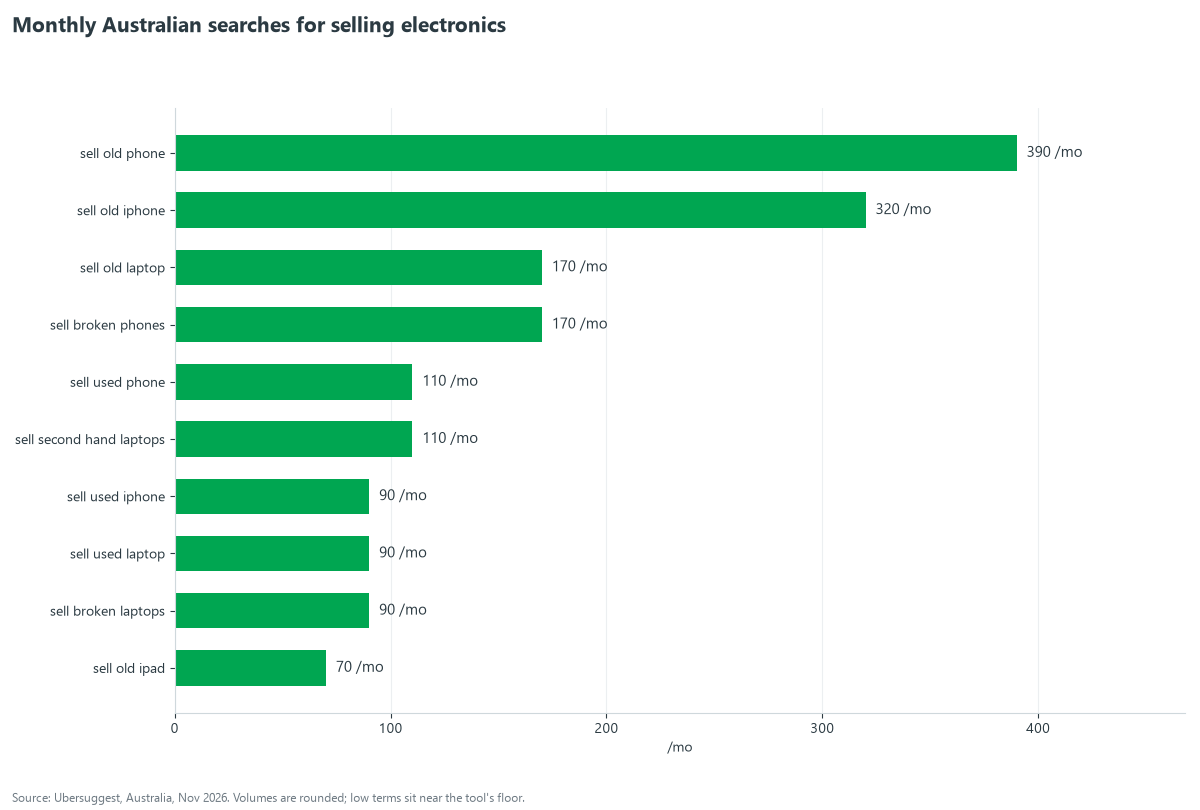
"Sell old phone" is searched about 390 times a month, "sell old iphone" about 320, "sell old laptop" and "sell broken phones" about 170 each, and "sell used phone" about 110. Terms with "broken", "faulty" and "second hand" are smaller: "sell broken laptop" about 70, "sell broken tv" about 40 and "sell faulty iphone" about 70, with a long tail of 10-a-month phrases for consoles, tablets, cameras and appliances. Two lessons follow. First, most people who say "old" have a working device they could sell whole. Second, "broken" and "faulty" searchers are fewer, but they have the sharper problem and the fewest good options, which is where a trade marketplace helps.
Step 1: Work out what you actually have
A device falls into one of four grades, and the grade decides the route:
- Working but old. It powers on and does what it should. It can usually be sold whole, traded in or donated.
- Repairable. A known, fixable fault such as a cracked screen, a dead battery or a failed charging port. A repairer will pay for a repairable device if the model is common.
- Parts only. It does not power on or has several faults, but boards, panels, cameras or storage may still work. Parts buyers want the exact model.
- Scrap. Water-damaged, crushed or very old. It is worth its materials, or nothing, and free recycling is usually the answer.
Be honest about the grade. Buyers check, and a device described as working that is not will cost you the sale or a dispute.
Step 2: Check you are not giving up a right
If the device is recent and failed early, the fault may not be yours to bear. The Australian Competition and Consumer Commission says a major problem gives the consumer a choice of refund or replacement, a minor problem lets the seller choose, and consumer guarantees can outlast a manufacturer's warranty. This is a summary of ACCC material, and we are not lawyers, so confirm it for your case. Our companion guide Can You Sell a Broken TV in Australia? sets out the same rights.
Step 3: Wipe it and release the account locks
This step matters more than the sale itself. A device with your account still attached is hard to sell and risky to hand over. The steps depend on the device, and each of our guides covers one:
- iPhone and iPad. Apple says to sign out, turn off Find My (which removes Activation Lock), erase all content and settings, and remove the device from your trusted devices. See Sell a Broken or Old iPhone in Australia.
- Android phones. Google says to remove your Google Account before selling, which turns off Factory Reset Protection, then factory reset. See Sell an Old Phone for Cash in Australia.
- Laptops. Microsoft says to use Remove everything with the clean drive option for a PC you are selling, and have your BitLocker key ready if the drive is encrypted. Apple's Erase All Content and Settings handles Macs. See Sell an Old or Broken Laptop in Australia.
- Consoles, tablets and cameras. Each maker has its own deactivation step. See Sell Faulty Consoles, Tablets and Cameras.
If a device is too broken to wipe, the safest option is to remove the storage drive or card before it leaves your hands. Check cyber.gov.au for Australian guidance. The closest official advice we found is from the UK's National Cyber Security Centre, which also notes that a determined expert may recover data after a factory reset.
Step 4: Describe it so a buyer can price it
A good listing is specific. Include the make and model, the age, the storage or specification where it applies, what works and what does not, the exact fault in plain words, what is included (charger, box, accessories), and clear photographs of the front, the back and any damage. Say the grade: working, repairable, parts only or scrap. For a lot, add the quantity, the mix of models and the condition split. Do not guess at faults you have not tested.
Where to sell: the routes compared
- Sell whole to a consumer. Best for working devices. You get the highest price and the most work. Classified sites suit this, and we cover them in the best way to sell old electronics online in Australia.
- Trade-in. Convenient, but credit depends on condition. Apple's US trade-in page says devices that are not eligible are recycled free and that very old or severely damaged devices may not get credit. We could not confirm Australian terms.
- Sell to a repairer, refurbisher or trader. The right route for faulty, parts-only and bulk devices. This is where ScrapTrade fits.
- Free recycling. The National Television and Computer Recycling Scheme and MobileMuster take devices at no charge. The first covers TVs, computers, laptops, tablets, monitors, printers and peripherals for households and small businesses. The second takes any mobile phone, plus batteries, chargers and accessories. We could not open the government pages directly, so confirm what each drop-off accepts. We explain what happens to a device afterwards in Where Old Electronics Go After You Hand Them In.
Why sell on ScrapTrade
ScrapTrade is a marketplace for scrap and recyclable material, with e-waste, batteries and precious metals among its twelve categories. It is built for sellers who have more than one thing to move, or something that is not worth a retail listing. The case for it is practical:
- The buyers are traders. ScrapTrade describes its buyers as verified traders and buyers in more than 50 countries. Repairers, refurbishers, recyclers and parts buyers look for exactly the faulty, old and bulk stock that is hard to sell to a retail customer.
- Listing is free and there is no commission. You create a listing in minutes, add photos, set a price and use the built-in AI to help write the description.
- You keep control of price and terms. You chat and negotiate with buyers in real time and agree collection or shipping terms directly. Listings carry terms such as EXW and FOB, in Australian or US dollars.
- Payments are protected. After a bid, the buyer's 5 percent deposit is held in escrow, and it stays on hold once the bid is accepted. Payments are handled through Stripe.
- Sellers are verified. ScrapTrade runs identity and business verification on sellers, and both businesses and individuals can sell.
- It fits the awkward cases. A box of dead phones, a pallet of retired monitors or a mixed e-waste lot has a category, a buyer pool and a way to be described.
How it works, step by step
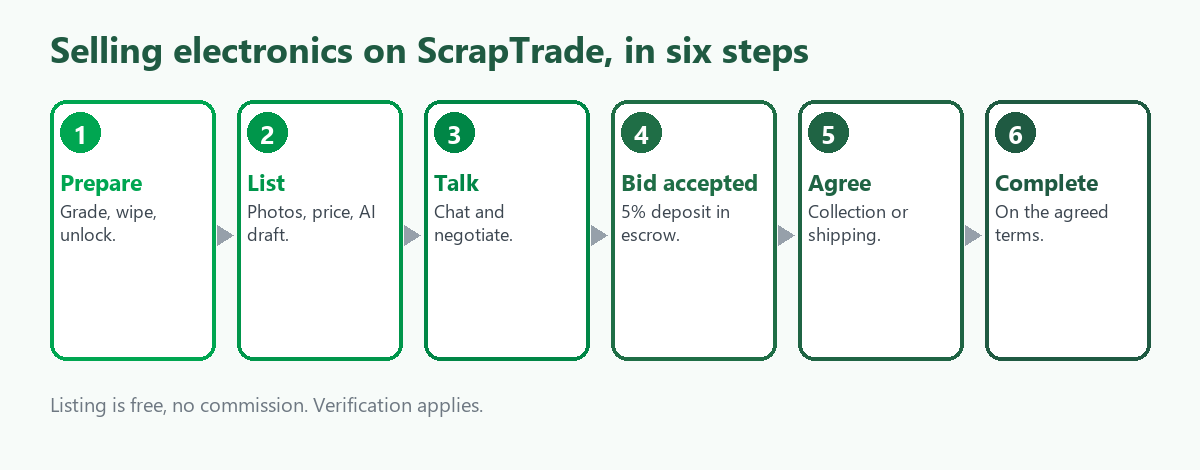
- Prepare. Grade the device, wipe it and release the account locks, and gather photos.
- List. Create an account, complete verification, and create a listing with your photos, price and description. The AI helper can draft the text, which you should check.
- Talk. Buyers send inquiries. You chat and negotiate in real time.
- Bid accepted. When you accept a bid, the buyer's 5 percent deposit is held in escrow.
- Agree logistics. You and the buyer agree collection or shipping terms.
- Complete. The sale is completed on the terms agreed.
Where it does not fit
Be realistic. ScrapTrade is a trade marketplace, so offers will be trade offers, not retail prices. A single working, recent phone will often fetch more from a consumer buyer or a trade-in. A device you cannot be bothered to list is better recycled free. The sweet spot is faulty, old or bulk stock where a trader's knowledge of parts and repair is worth more than a retail buyer's. For any question not answered here, including verification steps, contact the team at cs@scraptrade.com.au.
Which guide to read next
- Can You Sell a Broken TV in Australia? for TVs, including sets with broken screens.
- Sell an Old Phone for Cash in Australia for old, used and unwanted phones.
- Sell a Broken or Old iPhone in Australia for iPhones in any condition.
- Sell an Old or Broken Laptop in Australia for laptops and MacBooks.
- Sell Broken Laptops, Phones and Monitors for the free recycling options in detail.
- Sell Faulty Consoles, Tablets and Cameras for gaming gear and other gadgets.
- Sell a Used or Broken Washing Machine or Fridge for appliances.
- Where Old Electronics Go After You Hand Them In for what happens to a device after it is recycled.
You can browse the marketplace or create a free account.
What we could not verify
- What broken, faulty or old devices sell for. We found no reliable source, so we give no price.
- ScrapTrade's verification steps and timelines. The public FAQ pages we saw did not show the answers.
- Australian trade-in terms. We saw only Apple's US page and forum posts.
- The current details of the free recycling schemes. We relied on search summaries of government and program pages.
- How many buyers on ScrapTrade are active in each device category.
- Whether data can be recovered from a reset device. Experts differ, and the UK guidance says it may be possible.
Frequently asked questions
Can I sell a broken or faulty electronic device?
Yes. Repairers, refurbishers and parts buyers purchase faulty devices if you describe the fault and model honestly. Expect a lower offer than for a working device.
What is the best way to sell old or used electronics?
Working devices usually do best sold whole to a consumer or traded in. Old devices in bulk, and anything faulty, suit a trader or a trade marketplace.
Do I need to wipe my device before selling it?
Yes. Sign out, remove account locks and erase it, or remove the storage drive if you cannot. Our guides cover each device.
Can individuals sell on ScrapTrade?
Yes. Both businesses and individuals can sell, after identity and business verification. Contact support at cs@scraptrade.com.au for the process.
Is it free to list on ScrapTrade?
Listing is free and there is no commission. Ask support if you have questions about any other costs, such as shipping.
What if my device is not worth selling?
Recycle it free. The national television and computer scheme and MobileMuster accept most devices at no charge.
Sources
- Ubersuggest keyword data for Australia, queried November 2026.
- Australian Competition and Consumer Commission, consumer guarantee pages, as summarised in search results.
- Apple Support, "What to do before you sell, give away, or trade in your iPhone or iPad" and "What to do before you sell, give away, trade in, or recycle your Mac".
- Microsoft Support, "Reset your PC" and cloud rebuild guidance.
- Google, Android Help pages on factory reset and device protection, as summarised in search results.
- Department of Climate Change, Energy, the Environment and Water, National Television and Computer Recycling Scheme pages; MobileMuster program pages, as summarised in search results.
- ScrapTrade website, how-it-works, categories and verification statements, accessed November 2026.
This is general information, not financial, legal or security advice. ScrapTrade operates a scrap marketplace and has a commercial interest in the scrap trade.