

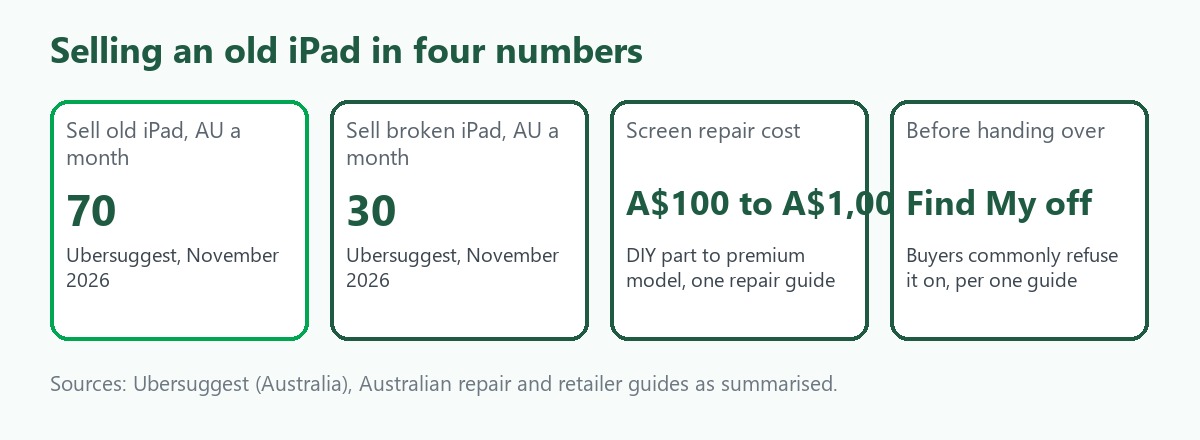
"Sell old iPad" is searched about 70 times a month in Australia, according to Ubersuggest, and "sell broken iPad" about 30. Those are small numbers, and the people behind them have a tablet in a drawer and want to know what it is worth and how to hand it over safely. An iPad is easy to sell. What goes wrong is leaving it tied to your Apple ID, because a buyer who cannot set it up will send it back, or will not pay. This guide covers what to do before you sell, what buyers look at, whether to repair a cracked screen first and where to get quotes. It sits beside our guides on selling a broken or old iPhone and selling faulty consoles, tablets and cameras. We give no prices. ScrapTrade runs a scrap marketplace and has a commercial interest in the scrap trade.
Before you sell: get it off your account
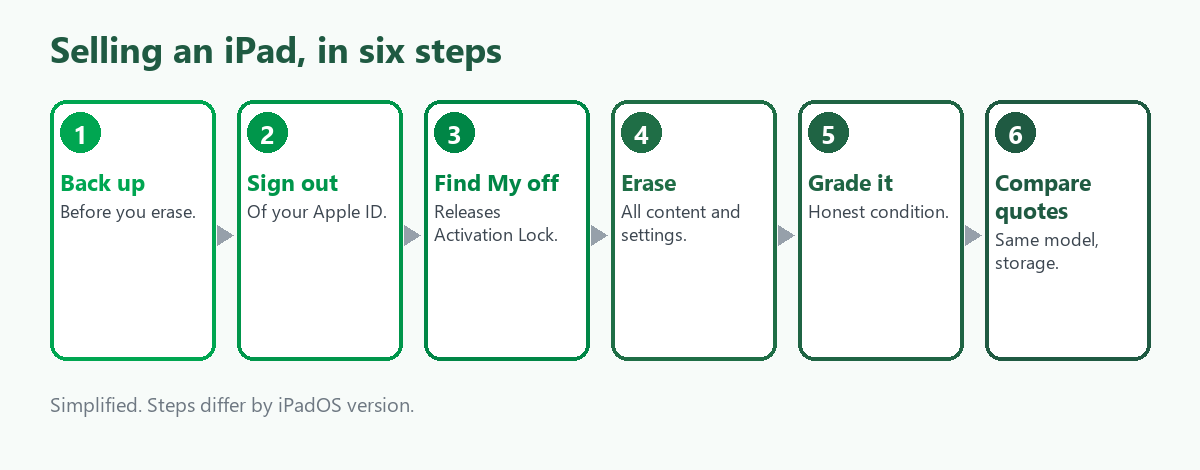
The guides we read, which include Australian retailers and general tech sites and not Apple's own pages, agree on the order:
- Back up. Do this first, because the next steps remove everything.
- Sign out of your Apple ID. One Australian retailer says to do this in Settings before erasing.
- Turn off Find My. Activation Lock is linked to Find My and switches on automatically when Find My is on, so you may not know it is active. Most trade-in sites, according to one guide, will not accept a device with Find My still on.
- Erase all content and settings. In Settings, General, Transfer or Reset iPad. Erasing also turns off Find My and Activation Lock on most devices, according to the guides.
- Check the result. The iPad should show the hello setup screen and not your account.
Sources differ on whether erasing alone is enough, and some recommend turning off Find My first, so doing both is the safer order. We did not read Apple's own support page on what to do before you sell, give away or trade in a device, and it is the authoritative reference, so check it for your iPadOS version.
If you already handed it over
A common mistake is erasing the iPad but leaving it on your account. The guides say you can remove the device from your account on iCloud.com or in the Find My app, which releases Activation Lock for the new owner. Forum posts describe this as a fallback and not a plan, and one says the only way to remove a device from Find My is to erase it from another device, so treat the details as unconfirmed and use Apple's support pages.
What buyers look at
- Model and generation. A UK recycler lists model and generation first. An older iPad can be worth very little, and a recent iPad Pro far more, according to a US trade-in table whose figures we do not repeat because they are American and may be out of date.
- Storage and connectivity. Buyback calculators ask for storage size and whether it is Wi-Fi only or cellular.
- Condition. Buyers grade devices in bands such as boxed, flawless, good, cracked screen, faulty, no power or water damaged. One guide says a cracked screen does not stop a sale as long as the device switches on, and the price will be lower.
- Accessories. Include the charger and cable, and the box if you have it.
We found nothing on how buyers treat battery health, so ask the buyer how it grades a tired battery.
Repair first, or sell as it is?
An Australian repair guide says a replacement screen can cost under A$100 for a do-it-yourself part and more than A$1,000 for a premium model. A US trade-in site compares repair cost with resale value by model, which is the right test, though its numbers are not Australian. The arithmetic is simple. If the repair costs more than the difference between a quote for the cracked iPad and a quote for a working one, sell it as it is. Get a written quote for both before you pay for a repair.
Where to sell
- Buyback stores and online buyback sites. They quote by model, storage and condition and may accept a cracked or faulty device. Quotes for the same model can differ widely, one Australian guide says, and a low quote does not always mean something is wrong.
- Trade-in programs. Retailers and Apple take iPads for credit, and we did not review Apple's Australian terms.
- Marketplaces and classifieds. More control over price, with fees, shipping and buyer questions on you.
- Repairers. A repair shop may buy a device for parts.
Compare at least three quotes for your exact model, and do not give personal details until you choose a buyer.
A dead or unsellable iPad
If it will not power on, some buyers still quote for it, and kiosk operators in the US say they accept iPads that will not turn on. For an Australian drop-off, Planet Ark's recycling directory lists drop-off points for the national television and computer scheme, and we could not confirm that tablets are on its accepted list, so check with the site before you go. Erase the iPad first if it still starts, and a device that will not start may still hold your data, so think about whether you want to keep the storage.
Where ScrapTrade fits
One iPad belongs with a buyback site, a trade-in or a marketplace, and ScrapTrade is not the right route for a single device. It may suit a school, a business or a repairer clearing a crate of tablets, because e-waste is one of the marketplace's twelve categories and verified traders in more than 50 countries bid on lots. Listing is free with no commission, price and terms are negotiated live and an accepted bid places the buyer's 5 percent deposit in escrow. Businesses and individuals can sell after verification. Wiping every device is the seller's job, and we could not confirm that working tablets can be listed, so email cs@scraptrade.com.au before you plan around it.
What we could not verify
- What any iPad is worth. We give no prices, and the one table we found is American.
- Apple's own instructions and trade-in terms in Australia.
- Battery health grading.
- Whether tablets are accepted at the national recycling drop-off points.
- Whether ScrapTrade accepts working tablets.
Frequently asked questions
Do I have to turn off Find My before I sell my iPad?
Yes in practice. Most trade-in sites, according to one guide, will not accept a device with it on, and the new owner cannot activate it if Activation Lock is still on.
Can I sell an iPad with a cracked screen?
Yes. Buyers grade it lower, and one guide says it still sells if the device switches on.
Should I fix the screen first?
Only if the repair costs less than the gap between a cracked-iPad quote and a working-iPad quote. Get both in writing.
Where do I get the best price?
Compare quotes from several buyback sites for your exact model, storage and connectivity. We found no source that ranks them.
Can I list iPads on ScrapTrade?
Verified sellers can list e-waste. Single tablets are better sold elsewhere, and we could not confirm working devices, so ask support.
Sources
- Ubersuggest keyword data, Australia, queried November 2026.
- Australian retailer and general tech guides on signing out, Find My, Activation Lock and erasing an iPad, as summarised in search results. Apple support pages were not reviewed.
- Buyback and recycler guides on condition grading, and an Australian repair guide on screen costs, as summarised in search results.
- Planet Ark recycling directory and council pages on the national television and computer recycling scheme, as summarised in search results.
- ScrapTrade website, accessed November 2026.
General information only, not security or financial advice. Steps differ by iPadOS version.