

Picture a scrap yard's paperwork. A docket book on the counter, a spreadsheet of stock that is right on Monday and wrong by Friday, a folder of invoices, and one shared login that everybody knows. Most small yards run like this, and it works until the day someone asks, "What did we pay that supplier last time?" or "Who let that docket through?" A digital scrap yard is the same yard, with those records kept in one place, tied to the people who made them. This guide explains what that means on ScrapTrade, what is in it, what it is not, and how to set one up. We describe what ScrapTrade's yard management page says it includes. We have not run a yard on it, and we flag what the page does not tell us.
What "digital scrap yard" means here
There is no official definition, so here is ours. A digital scrap yard is a yard whose day-to-day records live in software instead of paper: what is on site, who you buy from, who you sell to, what moved in and out, what has been billed and who has access. The yard is still physical. The trucks, the weighbridge and the sorting happen on site. What goes digital is the memory of the business.
On ScrapTrade this is built into the same account you use to trade. The yard management page says there is no separate software, subscription or login to learn [1]. That matters because most yard software is a separate system, and a seller then keeps two sets of records that never talk to each other. We explain what good yard software must do in Scrap Yard Billing: What the Software Must Do.
Meet Dee's yard (invented)
To keep this concrete, meet Dee. Dee runs a small yard with two staff, buys from local trades and sells to a regional buyer (invented). Her records are a docket book, a stock spreadsheet and a box of invoice copies. She loses about an hour every Friday matching them. She wants to know three things: what is in the yard, who owes her money and who on her team did what. We will follow her through each part of the yard tools.
The six parts of a digital yard
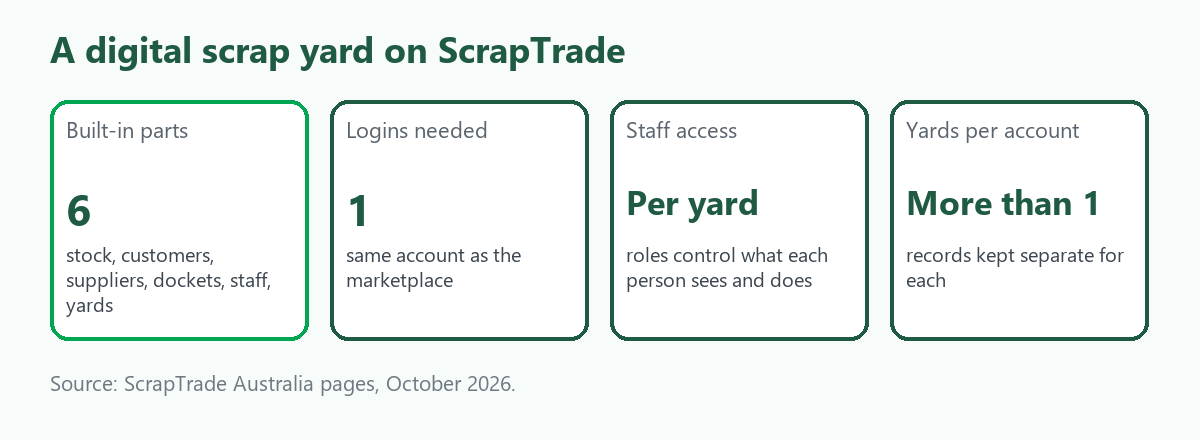
The page lists six built-in parts [1]. Here is each one in plain words, with what Dee would use it for.
1. Inventory. You track scrap material and pricing per yard, add items, search and filter by status, and see a transaction history for every entry, not just a current snapshot [1]. Dee adds "mixed copper wire, 140 kg" as an item. Later she can see not only what is in stock now but what happened to it along the way.
2. Customers. A record of who you buy from and sell to locally, kept separate from the verified buyers and sellers you reach through the wider marketplace [1]. Dee's regional buyer goes here with their details, so she is not hunting through old emails.
3. Suppliers. The businesses that supply material into your yard, with records distinct from your customers [1]. Her plumbing supplier and a demolition crew each get a supplier record. We explain what to keep on each in A Scrap Yard CRM: What to Record and Why.
4. Dockets and invoices. You generate dockets for material movements and invoices for transactions, filter by customer or supplier, and mark invoices paid as money comes in [1]. When the plumbing crew drops a load, Dee issues a docket. When she sells to the regional buyer, she raises an invoice and ticks it off when the transfer lands.
5. Employees and roles. You add staff to a specific yard, assign roles and control who can see and do what, so nobody shares a single login [1]. Dee wants her counter hand to handle dockets and to keep invoices to herself. The page says roles control what staff can see and do, but does not list the exact permissions, so she would check that the roles allow this.
6. Multiple yards. You can run more than one site from one account, with inventory, staff and records kept separate for each [1]. Dee has one yard now. If she opens a second, the stock lists do not blur together.
A Tuesday in Dee's digital yard
At 7:30 the plumbing crew arrives with a ute of old pipe and fittings. Dee's counter hand weighs it on the yard scale, checks the seller's identification, and issues a docket against the plumber's supplier record. Through the morning, a few walk-in sellers come with household scrap. Each gets a docket, and the amounts feed the same record.
At lunch, Dee opens the inventory and filters by status to see what is ready to sell. The copper wire has been sorted and is waiting. She checks its history to confirm the grade the team recorded. In the afternoon she raises an invoice to her regional buyer and, a few days later, marks it paid. At the end of the week she filters invoices by customer to see who still owes money. It takes minutes, where it used to take her Friday hour.
Notice what the software did and did not do. It kept the records, linked them to people and made them searchable. It did not weigh the copper, grade it, check the ID, or decide a price. Those stayed human jobs.
Yard records and marketplace trades are separate records
One detail on the page is easy to miss. Dockets and invoices are part of the yard's own record-keeping, tracking material movements and billing local customers and suppliers. They are a separate record from marketplace transactions, which have their own order and payment history [1].
In practice that means Dee's local sale to the regional buyer sits in her yard records, and a lot she lists on the ScrapTrade marketplace, with bids, negotiation and a payment through the platform, sits in the marketplace record. Both live in one login, but they are not the same ledger. If you run both, plan to check each. For how a marketplace deal works, see How It Works. Payment on the marketplace is held in escrow from the moment a deal is confirmed and released once pickup or delivery is confirmed, as the Trust & Safety page says.
What a digital yard does not do
- It is not a weighbridge. If you trade by weight, the scale and its approval are a separate matter. The National Measurement Institute says a trade weighbridge must be an approved type verified by a licensee, as we set out in Scrap Yard Automation.
- It is not payroll or HR. The employee tools are staff access for a specific yard: who can log in, what they can do, and basic contact details. The page says it is not payroll, scheduling or a broader HR platform [1].
- It does not do your compliance for you. The state rules still apply. In NSW a dealer must keep a record of each purchase for three years, and electronic or hard copy is acceptable. Victoria lists the details to record on each purchase. See Scrap Business Rules in Australia by State. A tidy digital record helps, but whether your records meet your state's rules is for you and your regulator to check.
- It does not sell your scrap by itself. Selling on the marketplace is a separate step.
Set up a digital yard in four steps
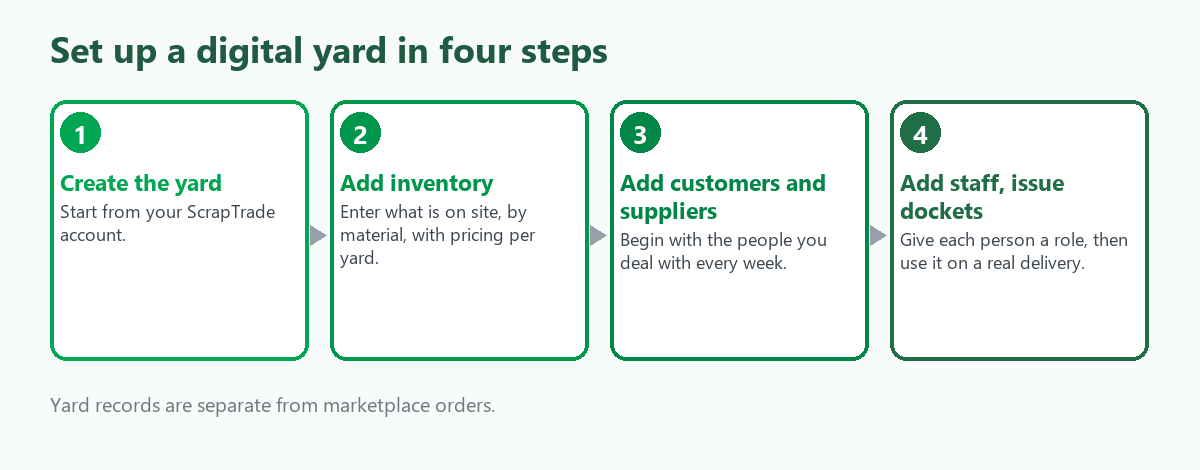
- Create the yard. Start with your ScrapTrade account and add the yard. The page says every feature works the same for a single yard [1].
- Add inventory. Enter what is on site now, by material, and set pricing per yard. Start with your top five items and add more as you go.
- Add customers and suppliers. Begin with the people you deal with every week. Their records are separate from each other and from the marketplace [1].
- Add staff and start issuing dockets. Give each person the role they need, and issue the first docket on a real delivery, not a practice one.
Create a free account to set up a yard. The page says yard management is part of your ScrapTrade account, and to see the pricing page for current plan details [1].
Who a digital yard suits
- An existing small yard with paper or spreadsheet records that wants one place for stock, suppliers, customers and staff.
- A yard owner who also wants to sell online. The yard tools and the marketplace share an account [1].
- A new yard owner who wants records right from day one. For the bigger planning questions, see Starting a Scrap Yard in Australia: A Checklist.
- A multi-site operator who needs stock and staff kept apart.
If you want to deal in scrap without a yard at all, as a broker or agent, the yard tools are not the point. See Who Is Who in Scrap.
What we could not verify
- Whether a docket automatically changes your stock count. The page says dockets track material movements, not that inventory updates by itself. Ask ScrapTrade support.
- Whether you can use the tools without a physical site. The page describes yards. Ask before you rely on it.
- Whether it connects to a weighbridge, accounting package or printer. Not stated.
- Mobile access and data export. Not stated.
- What it costs. The page points to the pricing page for current plans.
Frequently asked questions
What is a digital scrap yard?
A yard whose records for stock, suppliers, customers, dockets, invoices and staff are kept in software, in the same account used to trade on the marketplace [1].
Is the yard software separate from the ScrapTrade marketplace?
No. It sits inside the same login, with no separate signup or system [1].
Can I run more than one yard?
Yes. Multiple yards can be run from one account, with inventory, staff and records kept separate for each [1].
Does it replace payroll?
No. It manages staff access to a yard, not payroll or scheduling [1].
Are yard dockets the same as marketplace orders?
No. They are a separate record from marketplace transactions, which have their own order and payment history [1].
Sources
- ScrapTrade Australia, Scrap Yard Management Software, as published in October 2026.
Dee and her yard are invented. This describes ScrapTrade's published yard management page and is general information, not legal or tax advice. ScrapTrade operates a scrap marketplace and has a commercial interest in the scrap trade.